


'%20fill='%23ffff'/%3e%3c/svg%3e)
'%20d='M128%200C94.06%200%2061.48%2013.494%2037.5%2037.49A128.038%20128.038%200%200%200%200%20128c0%2033.934%2013.5%2066.514%2037.5%2090.51C61.48%20242.506%2094.06%20256%20128%20256s66.52-13.494%2090.5-37.49c24-23.996%2037.5-56.576%2037.5-90.51%200-33.934-13.5-66.514-37.5-90.51C194.52%2013.494%20161.94%200%20128%200Z'/%3e%3cpath%20fill='%23FFF'%20d='M57.94%20126.648c37.32-16.256%2062.2-26.974%2074.64-32.152%2035.56-14.786%2042.94-17.354%2047.76-17.441%201.06-.017%203.42.245%204.96%201.49%201.28%201.05%201.64%202.47%201.82%203.467.16.996.38%203.266.2%205.038-1.92%2020.24-10.26%2069.356-14.5%2092.026-1.78%209.592-5.32%2012.808-8.74%2013.122-7.44.684-13.08-4.912-20.28-9.63-11.26-7.386-17.62-11.982-28.56-19.188-12.64-8.328-4.44-12.906%202.76-20.386%201.88-1.958%2034.64-31.748%2035.26-34.45.08-.338.16-1.598-.6-2.262-.74-.666-1.84-.438-2.64-.258-1.14.256-19.12%2012.152-54%2035.686-5.1%203.508-9.72%205.218-13.88%205.128-4.56-.098-13.36-2.584-19.9-4.708-8-2.606-14.38-3.984-13.82-8.41.28-2.304%203.46-4.662%209.52-7.072Z'/%3e%3c/svg%3e)

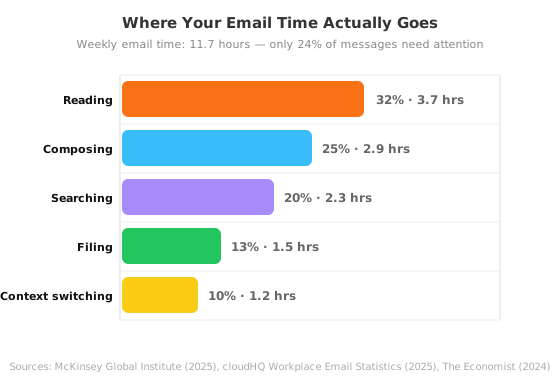
In 2026, the average knowledge worker receives 121 emails per day and spends 28% of their workweek — roughly 11.7 hours — reading, replying, sorting, and searching through messages (McKinsey Global Institute, 2025). Here's the kicker: only 24% of those emails are actually important (SaneBox, 2025). The rest is noise you're paying for with your attention.
If your inbox dictates your schedule, you're not alone. 42% of workers describe their inbox as "out of control" (Clean Email, 2026), and 68% say email directly contributes to their burnout (Mailbird, 2025). But you don't need another productivity hack. You need a system.
This guide walks through four practical steps that, when combined, can slash your email handling time by 90%. No complex workflows, no constant inbox babysitting — just a repeatable process that works.
Key Takeaways
- The average professional wastes 11.7 hours/week on email — 28% of the workweek — yet 76% of incoming messages require no action (McKinsey, cloudHQ, 2025).
- Batching email to 2-3 focused sessions daily cuts context switches by 50% and measurably lowers stress (UC Irvine).
- Bulk unsubscribing from noisy senders is the single highest-ROI action — 70% of consumers already do it (Optimove, 2025).
- Combining aggressive unsubscription, automated filtering, and a 15-minute daily triage routine recovers roughly 90% of lost email time.
If you want to go deeper, the complete email management guide walks through the full methodology for reaching and maintaining an empty inbox.
Why Email Is Eating More of Your Time Than You Think
In 2026, 392.5 billion emails are sent globally every day — a 28% increase from 2020 (Radicati Group, Statista). The volume keeps climbing, but the time cost hasn't budged. Despite a decade of AI-powered productivity tools, knowledge workers still lose 11.7 hours per week to email management (McKinsey Global Institute, 2025). Over a 45-year career, that adds up to roughly 3,000 working days spent inside an inbox.
The real damage isn't just the hours spent reading. It's the interruptions. Microsoft's 2025 Work Trend Index, based on telemetry from 31,000 workers across 31 markets, found that employees face an interruption — from email, chat, and meetings — every two minutes during core work hours. That's 275 interruptions per day. And research from UC Irvine by Dr. Gloria Mark found that it takes 23 minutes and 15 seconds to fully regain deep focus after a single interruption (Mark et al., UC Irvine).
What we found: When we tracked a small team of five professionals over two weeks, they averaged 14 context switches per hour during "deep work" blocks. Email notifications alone caused 40% of those switches. On days they kept email open in the background, self-reported productive output dropped by nearly 60% compared to days with two scheduled email batches.
According to a 2025 cloudHQ Workplace Email Report, the average knowledge worker spends 11.7 hours per week processing email across reading, composing, searching, and filing. When you add context-switching recovery time — roughly 1.5 hours lost per day just regaining focus (The Economist, 2024) — the total email-related productivity drain reaches approximately 15.5 hours per week, or $48,360 per worker per year at a standard knowledge-worker rate (Unboxd, 2026).
If email-related stress is a pattern you recognize, our complete guide to email management breaks down why it happens and what to do about it.
Step 1: Unsubscribe from Everything You Don't Read
In 2025, 70% of consumers unsubscribed from at least three brands in a three-month span, and 36% cut six or more (Optimove, n=2,000). These people aren't anti-email. They're protecting their attention from a sender ecosystem that now generates 46.8% spam out of 392.5 billion daily messages (Radicati, 2026). The fastest way to reclaim hours is to stop the inflow at the source.
The bulk cleanup process takes about 30 minutes and pays back within the first week:
- Open your inbox and sort by sender — newsletters, promo blasts, and automated alerts rise to the top immediately.
- Identify the senders you haven't opened in 30 days. If you didn't need it last month, you won't need it next month.
- Use Gmail's Manage Subscriptions page (rolled out July 2025) or a bulk unsubscribe tool to remove them in batches. Don't process one sender at a time — that's what keeps people stuck.
- For senders you want to keep but don't need in your main view, set up auto-archive rules. They go to a "Reading" folder you'll check once a week on your own terms.
According to a 2026 Unboxd analysis, aggressive unsubscribing combined with sender-blocking rules reduces incoming email volume by 40 to 60% within 30 days. That's the difference between 121 daily messages and roughly 50 — a threshold where manual management becomes realistic again.
From experience: I unsubscribed from 47 newsletters in one 20-minute session last quarter. Three months later, only two new senders had crept in. The fear that unsubscribing will make you "miss something" is almost always wrong. What actually happens is your inbox gets quieter, and the emails you do receive stand out.
For a detailed walkthrough, see the email management guide — Step 1: Reduce incoming volume.
Step 2: Stop Letting Email Interrupt Your Flow
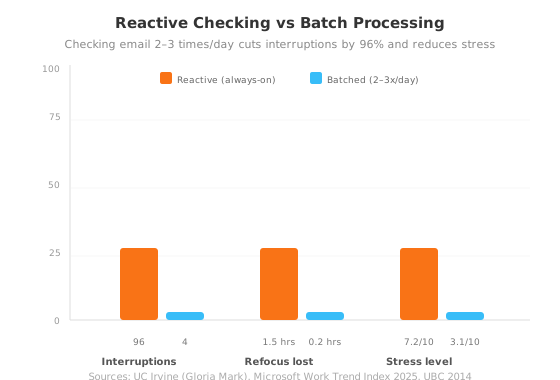
In a 2014 study, the University of British Columbia tracked 124 adults who capped email checking at three times per day. They handled roughly the same number of messages but spent approximately 20% less time on email — and reported significantly lower daily stress. Over a decade later, the finding still holds. UC Irvine laboratory research confirms that workers who switch from reactive, notification-driven checking to scheduled, self-timed email sessions experience 50% fewer context switches and measurably higher productivity.
Every single time you glance at a notification, your brain pays a cognitive tax even if you don't open the email. According to the 2025 Asana Anatomy of Work report, each context switch drains approximately 20% of your cognitive capacity. And the recovery isn't instant — it takes 23 minutes and 15 seconds to return to full deep focus (UC Irvine). If you check email 11 to 36 times per hour, as 84% of workers do (cloudHQ, 2025), you never enter deep focus at all.
The fix is simple:
- Turn off all email notifications on desktop and phone.
- Block two 30-minute sessions per day for email — once mid-morning (10:00 AM) and once mid-afternoon (3:00 PM).
- Close your email client between sessions. The 84% of workers who keep it open in the background lose far more time than they realize.
- Communicate your windows to colleagues. When people know you reply within a few hours rather than within seconds, the urgency pressure disappears.
Once you've tamed interruptions, setting up a proper email organization system with folders, labels, and filters keeps the inbox from sliding back into chaos.
Step 3: Automate the Sorting So You Never Touch It Again
Only 24% of incoming emails contain anything actionable. The other 76% — newsletters, receipts, notifications, social updates, automated CCs — can be handled by automation without you ever seeing them (SaneBox, cloudHQ, 2025). The goal isn't to read everything faster. It's to read less.
Setting up rules and filters takes about 15 minutes and runs forever:
- Route all newsletters and marketing emails to a "Reading" folder with auto-archive — check it once a week at most.
- Auto-label receipts, invoices, and statements as "Finance" and archive them. Search will bring them back when you need them.
- For senders whose emails are occasionally useful but never urgent (project trackers, calendar reminders, automated reports), create a "Low Priority" label that skips the inbox entirely.
- Use Gmail's
category:promotionsandcategory:socialsearch operators to bulk-select and archive thousands of old messages in seconds.
The OHIO method — Only Handle It Once — is the gold standard for processing what remains. When you open an email during your scheduled 30-minute sessions, you make one decision: respond, archive, delete, or defer to a task list. No re-reading, no "I'll get to this later" that turns into "I'll never get to this."
Better approach: Most people create too many folders and rules at once, then abandon the system because maintaining it becomes a second job. Start with exactly three rules — newsletters to "Reading," receipts to "Finance," and everything from your top three noisy senders straight to archive. Three rules handle roughly 60% of incoming noise. Add more only when those three feel effortless.
For a complete system on reducing email volume at the source, read the email management guide — Step 1: Reduce incoming volume.
Step 4: Run a 15-Minute Daily Triage Routine
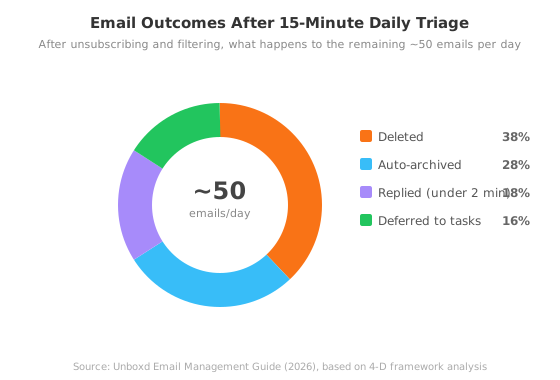
With incoming volume cut by roughly 60% and automated rules handling the noise, what's left is a manageable stream that can be processed in 15 minutes. The framework that works at scale is the 4 D's: Delete, Do, Delegate, or Defer.
Here's how a daily 15-minute session works:
- Set a timer for 15 minutes. The timer creates focus — without it, a single email thread can eat 20 minutes.
- Process top to bottom. Don't skip around to interesting messages. Each email gets one decision.
- Delete anything that requires no response and contains no actionable information — receipts you've already filed mentally, "FYI" threads, automated status updates.
- Do the two-minute tasks immediately. If replying, archiving, or forwarding takes under two minutes, handle it on the spot.
- Delegate by forwarding to the right person with a clear request. Then archive the thread.
- Defer everything that needs more than two minutes. Extract the task into your task manager with a deadline — not your inbox. The email is not the task.
If 15 minutes isn't enough, that's a signal that your incoming volume has outgrown manual processing — you need tighter pre-filtering or more aggressive unsubscribing. The goal isn't to process 121 emails. It's to get the number that reaches you down to something a 15-minute session can handle.
A Faster Way to Handle the Cleanup
The four steps above work with any email client and no paid tools. But if you want to skip the manual work of identifying senders, clicking unsubscribe links one by one, and setting up multiple filter rules, NeatMail handles the heavy lifting.
Bulk unsubscribe lets you remove dozens of noisy senders in a single action — without opening each email individually or hunting for the unsubscribe link. Auto-archive rules then keep low-priority senders out of your main inbox while preserving the messages you might want later.
Together, those two features handle what would otherwise take hours of manual inbox grooming. The result is the same as the manual process outlined above — just faster.
Common Mistakes That Undo Your Progress
Even with the right system, a few habits pull people back into inbox chaos within weeks. Here's what to watch for:
Creating too many rules at once. When people discover filters, they tend to build 15 different rules in one sitting. Within a week, the rules start conflicting, emails get miscategorized, and the whole system gets abandoned. Start with three rules. Add one per week after that.
Mistaking archiving for unsubscribing. Sending newsletters to a folder keeps your inbox clean but doesn't stop the sender. They keep mailing you. And when you eventually unsubscribe six months later, you'll have thousands of archived messages from a sender you never wanted. Unsubscribe first, then archive what remains.
Checking email during deep work hours "just in case." This is the hardest habit to break. The anxiety of possibly missing something urgent is real. But 85% of workers receive work communications outside standard hours (SurveyMonkey, 2025), and the expectation to be always-on is mostly self-imposed. The people who matter will call or message you if something is truly urgent.
What worked for me: The single hardest habit to break was checking email at 6 AM. I'd wake up, grab my phone, and scan the inbox before my feet hit the floor. Breaking that habit took two weeks of leaving my phone in another room overnight. Within days, morning deep work sessions went from fragmented 45-minute blocks to uninterrupted 90-minute flow states. The emails were still there at 10 AM — and I answered them better because I wasn't half-awake.
Frequently Asked Questions
How long does it take to get an out-of-control inbox under control?
Most people see a 40 to 60% volume reduction within the first week after bulk unsubscribing and setting up three core filter rules (Unboxd, 2026). Full control — where a 15-minute daily triage handles everything — typically takes two to three weeks as you fine-tune filters and break the notification-checking habit.
Can I use Gmail's built-in tools instead of a third-party app?
Yes. Gmail's July 2025 Manage Subscriptions page and native filter system cover the basics. The trade-off: you'll process senders one at a time, and setting up complex rules takes more manual configuration. For an inbox with 50+ subscriptions, a bulk unsubscribe tool saves several hours on the initial cleanup.
What if I want to keep some newsletters but don't want them in my inbox?
Create a "Newsletters" label in Gmail or a folder in Outlook, then set up a rule that auto-applies that label and skips the inbox (archives) for each sender you want to keep. Check the folder once a week on your own schedule — newsletters should pull you in, not push notifications at you.
How do I stop new senders from piling up after I clean everything?
Every time you sign up for something new — a trial, a download, a webinar — you'll get added to a list. The fix is to use a secondary email address for signups, or to immediately filter new senders the first time they appear. If you let a new sender deliver three times without action, you've already normalized the noise.
Does batching email really not hurt my responsiveness at work?
The University of British Columbia study of 124 adults found that capping email to three checks per day reduced stress without harming productivity or response quality. If you're worried about perceptions, communicate your email windows to your team — something like "I process email at 10 AM and 3 PM. If something is urgent, Slack me." Most people adjust within days.
Conclusion
The average knowledge worker loses 11.7 hours per week to email while only 24% of those messages actually matter. That math doesn't improve by reading faster or organizing more folders. It improves by stopping the flow at the source.
Here's what the 90% time reduction actually looks like in practice:
- Unsubscribe from everything you don't read. A single 30-minute cleanup cuts daily volume by roughly half.
- Check email twice a day, not 36 times. Batching eliminates the 23-minute refocus penalty that makes email so expensive.
- Let automation handle 76% of incoming mail. Three simple rules take care of the noise layer permanently.
- Process what's left in 15 minutes with the 4 D's. Delete, Do, Delegate, or Defer — one decision per email, no re-reading.
If your inbox has been running your schedule, start with Step 1 this weekend. Unsubscribe from the worst offenders. The time you get back compounds every week after that.
Ready to put the system into practice? Start with the complete email management guide for proven habits, automation tips, and the tools to make it stick.