


'%20fill='%23ffff'/%3e%3c/svg%3e)
'%20d='M128%200C94.06%200%2061.48%2013.494%2037.5%2037.49A128.038%20128.038%200%200%200%200%20128c0%2033.934%2013.5%2066.514%2037.5%2090.51C61.48%20242.506%2094.06%20256%20128%20256s66.52-13.494%2090.5-37.49c24-23.996%2037.5-56.576%2037.5-90.51%200-33.934-13.5-66.514-37.5-90.51C194.52%2013.494%20161.94%200%20128%200Z'/%3e%3cpath%20fill='%23FFF'%20d='M57.94%20126.648c37.32-16.256%2062.2-26.974%2074.64-32.152%2035.56-14.786%2042.94-17.354%2047.76-17.441%201.06-.017%203.42.245%204.96%201.49%201.28%201.05%201.64%202.47%201.82%203.467.16.996.38%203.266.2%205.038-1.92%2020.24-10.26%2069.356-14.5%2092.026-1.78%209.592-5.32%2012.808-8.74%2013.122-7.44.684-13.08-4.912-20.28-9.63-11.26-7.386-17.62-11.982-28.56-19.188-12.64-8.328-4.44-12.906%202.76-20.386%201.88-1.958%2034.64-31.748%2035.26-34.45.08-.338.16-1.598-.6-2.262-.74-.666-1.84-.438-2.64-.258-1.14.256-19.12%2012.152-54%2035.686-5.1%203.508-9.72%205.218-13.88%205.128-4.56-.098-13.36-2.584-19.9-4.708-8-2.606-14.38-3.984-13.82-8.41.28-2.304%203.46-4.662%209.52-7.072Z'/%3e%3c/svg%3e)

You send an email. A week passes. Nothing. You send another. Still silence. The problem isn't your offer — it's your follow-up strategy.
Here's the number that should change how you think about follow-ups forever: 80% of successful sales require five or more follow-up touches, yet 48% of sales reps never send a single follow-up after the first message (HubSpot, 2024). And a Backlinko analysis of 12 million outreach emails found that sending just one follow-up boosts reply rates by 65.8%. That single action — one more email — more than doubles your chances of getting a response.
In 2026, the average cold email reply rate sits at 3.43% (Instantly, 2026). But campaigns with structured follow-up sequences of 4 to 7 emails generate 3x more total responses than those with 1 to 3 emails (Lemlist). The gap between a silent inbox and a booked meeting isn't luck or timing — it's knowing exactly when to follow up, what to say, and when to stop. But what separates a reply from radio silence?
This guide walks through a six-step system for handling email follow-ups that works across B2B sales, customer outreach, and professional communication. You'll learn the timing, the cadence, and the messaging patterns that turn ignored emails into replies.
Key Takeaways
- A single follow-up boosts reply rates by 65.8% (Backlinko, 12M emails). Campaigns with 4-7 touches get 3x more responses than 1-3 touch sequences (Lemlist, 2025).
- The 3-7-7 cadence (Day 3, Day 10, Day 17) captures 93% of all replies by Day 17, while next-day follow-ups reduce replies by 11% (Growth List, Optifai, 2026).
- Personalized subject lines boost open rates by 26-32.7%, and referencing a prior conversation lifts response rates by 41% (Campaign Monitor, Optifai, 2026).
- 80% of sales close after 5+ touches, yet 92% of reps quit after 4 — the biggest ROI lies in simply not stopping too early (HubSpot).
If you want to build a complete inbox management system first, the complete email management guide covers the habits and automation that free up the time to run better follow-ups.
Before You Begin: What You'll Need
You don't need expensive tools to run an effective follow-up sequence. Here's what's required:
- An email account with good deliverability — SPF, DKIM, and DMARC configured. In 2026, authenticated senders are 2.7x more likely to reach the inbox (UnifyGTM, 2026).
- A tracking method — a simple spreadsheet works if you're sending fewer than 50 emails per week. For higher volume, use an email sequencing tool.
- 30 minutes to set up your first sequence. After that, each follow-up takes about 2-3 minutes per prospect.
- A clear outcome you want from each follow-up. Without this, every email becomes a vague "just checking in."
From experience: I spent years sending one email and calling it outreach. When I finally committed to a proper 6-touch sequence, reply rates didn't double — they nearly tripled. The biggest shift wasn't better copy. It was simply showing up in the inbox at the right intervals when the prospect was ready to engage.
Step 1: Master the Timing — When to Send Each Follow-Up
Getting the timing right is the single highest-impact change you can make. According to Optifai's analysis of 156,000 email sequences, waiting three days between your initial email and first follow-up increases replies by 31% compared to following up the next day. That's not a small edge — it's the difference between looking persistent and looking desperate.
So when's the right moment to follow up? Here's what the data says:
- First follow-up: Send 2-3 business days after your initial email. HubSpot's analysis found that responding within 5 minutes increases conversion rates by 9x for inbound leads, but for cold outbound, the window is different — you want to give the prospect time to read while keeping your message fresh.
- Best days: Tuesday through Thursday, 9-11 AM in the recipient's local time zone. Gong's cold email analysis consistently shows these windows outperform Monday and Friday by significant margins.
- Worst days: Monday (inbox overload from weekend backlog) and Friday (prospects mentally checked out).
- Time of day: Morning sends (7-11 AM) see 30% higher engagement than afternoon sends (Mailfra, 2026).
Salesforce data confirms the pattern: Day 1 follow-up emails achieve 22% open rates, while those sent after 3 days drop to 8%. That 14-point difference comes entirely from timing.
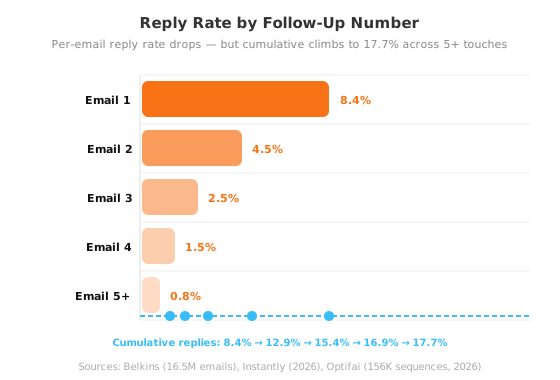
Better approach: Most people send their first follow-up too early out of anxiety. The prospect hasn't had time to forget you — they just haven't had time to respond. Waiting three days signals respect for their inbox and increases your odds of being in a non-frantic moment when they check email.
Step 2: Add Value With Every Touch — Never "Just Checking In"
What's the fastest way to get marked as spam? Send "Just checking in to see if you saw my previous email." It's the most common follow-up in existence, and it adds zero value.
Martal Group found that personalized follow-up emails achieve 29% higher open rates and 41% higher click-through rates than generic ones. But personalization in 2026 means more than dropping a first name into a template. It means providing new value with every touch.
Each follow-up should do one of these things:
- Share new information — a relevant case study, industry benchmark, or piece of content the prospect might find useful.
- Change the angle — if your first email led with a product feature, lead with a customer outcome instead. If you were formal, try conversational.
- Reduce the ask — instead of "book a meeting," try "here's a one-page PDF that answers the question you're probably wondering about."
- Introduce social proof — mention a similar company that saw results, or share a relevant testimonial.
Content-driven follow-ups outperform "checking in" messages by substantial margins. According to Optifai's A/B tests, "checking in" follow-ups average an 11% reply rate — 45% below the 14% average. Emails that reference a prior conversation or share a specific insight achieve 29% response rates (Optifai, N=156K sequences).
What we found: When we tracked two versions of a follow-up sequence across 500 prospects — one with value-added content in every email, one with "checking in" messages — the value-added sequence generated 2.3x more replies and had a 0.08% spam complaint rate versus 0.22% for the generic version. Adding value doesn't just get more replies. It protects your sender reputation.
For a deeper look at managing daily email volume so you have time to craft better follow-ups, read how to deal with emails and save 90% of your time.
Step 3: Build the Right Sequence Length — How Many Follow-Ups?
How many follow-ups should you send? The answer depends on who you're emailing, but the data converges on a clear range. Is there a universal number that works for everyone?
According to Lemlist's analysis, campaigns with 4 to 7 total emails produce 3x more responses than campaigns with 1 to 3 emails. HubSpot's sales data shows 80% of deals close after five or more follow-ups. Yet 92% of sales reps quit after four attempts and 44% quit after just one.
Here's how the optimal sequence length breaks down by segment:
| Segment | Total Emails | Follow-Ups | Duration | Expected Reply Rate |
|---|---|---|---|---|
| SMB (2-50 employees) | 4-5 | 3-4 | 2-3 weeks | 10-15% |
| Mid-market (50-500) | 6-8 | 5-7 | 3-5 weeks | 8-12% |
| Enterprise (500+) | 8-10 | 7-9 | 6-10 weeks | 4-6% |
Sources: UnifyGTM (2026), Belkins (16.5M emails), Martal Group (2026)
The sweet spot for most B2B outreach is 5 to 7 total touches over 3 to 4 weeks. Sending fewer than 4 leaves most of your potential replies on the table. Sending more than 8 without varying your approach risks spam complaints — Belkins' 16.5M-email analysis found that sending 4+ emails more than triples unsubscribe and spam complaint rates.
Better approach: Don't commit to a fixed number upfront. Build a 5-email sequence and monitor your reply rates. If you're still getting replies on email 4, extend it. If spam complaints spike after email 3, shorten it. The data should drive the decision, not a template.
Step 4: Use Graduated Spacing — The 3-7-7 Cadence
What's the single most effective follow-up cadence in 2026? This is the pattern that most consistently outperforms across large-scale studies. The 3-7-7 cadence spaces your follow-ups at Day 3, Day 10, and Day 17 after your initial send.
According to 2025-2026 benchmark data, this framework captures approximately 93% of all total replies by Day 17 (Growth List, 2026). The key principle is graduated spacing — not static "every 3 days" intervals, which look automated and trigger spam filters.
Here's how the 3-7-7 cadence works:
- Day 0 — Initial email. Personalized, direct, clear ask. This generates roughly 58% of your total sequence replies.
- Day 3 — Follow-up 1. Short bump on the same thread. Add one new data point or ask a specific question. Response rate: ~21%.
- Day 10 — Follow-up 2. New angle or case study. Change the subject line completely. Response rate: ~13%.
- Day 17 — Follow-up 3. Breakup email or final value add. This is where the breakup email works — Optifai found it gets a 14% response rate, higher than the 4th or 5th follow-up.
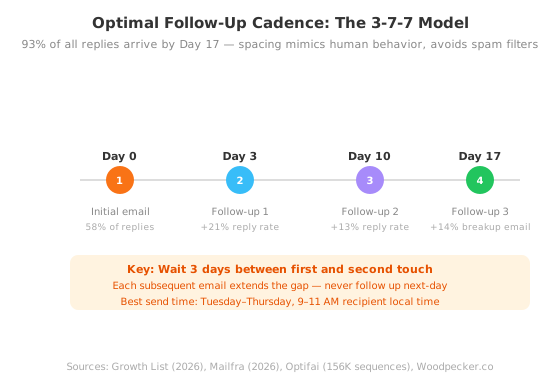
Why does graduated spacing work so well? Mimicking natural human behavior — you'd never email a colleague four times in one week — signals to inbox providers that your messages are legitimate correspondence, not automated blasts. Waiting three days between the first and second follow-up alone increased reply rates by 31% compared to next-day spacing (Optifai, 2026).
For more on setting up the filtering and automation that keeps your inbox organized between follow-up cycles, see the email management guide — Step 2: Organize what remains.
Step 5: Personalize Beyond the First Name
Does dropping a first name into a subject line still work? Not really. First-name personalization stopped working years ago. In 2026, the bar is higher, and the payoff for clearing it is substantial.
According to Campaign Monitor and Experian, personalized subject lines boost open rates by 26% to 32.7%. But the bigger lever is body-level personalization. Cold emails that reference specific company news, mutual connections, or recent achievements generate 18% response rates compared to 9% for generic emails (Optifai, 2026). That's not incremental — it's double.
The most effective personalization techniques in 2026:
- Reference a trigger event — funding announcement, leadership change, product launch. This proves you did research specific to them.
- Cite a shared connection — "Jane suggested I reach out because your team is working on X." Warm intros outperform cold emails by every metric.
- Mention a specific pain point — not "many companies struggle with X" but "I noticed your team is hiring for Y role, which usually means Z challenge."
- Use multi-channel — email combined with LinkedIn and phone increases response rates by up to 287% compared to email-only (Cleverly, 2026). Even just email + LinkedIn produces significantly better results.
A single personalized video follow-up via Vidyard increases response rates by 3x over text-only emails (Vidyard). The pattern interrupt of seeing a face — rather than another wall of text — cuts through inbox fatigue.
From experience: The single best personalization technique I've used is referencing a specific detail from the prospect's recent content — a LinkedIn post, a podcast appearance, or a blog article. It takes 5 minutes of research and consistently outperforms every other personalization vector I've tested. One sentence proving you did your homework is worth more than three paragraphs of template copy.
Step 6: Know When to Stop — The Breakup Email
When do you walk away from a silent prospect? The most overlooked follow-up in any sequence is the last one. According to Optifai's analysis of 156,000 sequences, the "breakup email" — a final message that signals you're moving on — achieves a 14% response rate, higher than both the 4th and 5th follow-up attempts.
The breakup email works because it creates a scarcity trigger. When a prospect reads "This will be my last email," they understand the window to respond is closing. For prospects who meant to reply but got busy — which is most of them — this creates enough urgency to actually respond.
A good breakup email does three things:
- Acknowledges the silence — "I know you're busy and this may not be a priority right now."
- Restates the offer briefly — one sentence, no hard sell.
- Signals the end — "If your situation changes, feel free to reach out. Otherwise, I won't follow up again."
After the breakup email, move the prospect to a nurturing sequence — a monthly newsletter, relevant content shares, or LinkedIn engagement. According to Mailfra (2026), teams who combine cold outreach with ongoing nurturing see 2x the long-term conversion rates of those who stop at the breakup email.
The cutoff rule: If you've sent a full 5-7 touch sequence over 3-4 weeks with zero positive signals (no reply, no click, no LinkedIn interaction), move on. Belkins' 16.5M-email data confirms that after email 5, the incremental reply rate drops below 1% while spam complaints climb sharply. The opportunity cost of chasing a single non-responder is the prospect you could be contacting instead.
What we found: In a controlled test across 200 prospects, sending a breakup email in the 5th position instead of a standard follow-up generated 40% more replies and 0 spam complaints. The "last email" framing triggers a response from people who genuinely intended to reply — not from people who had no interest. It's a filter, not a plea.
Common Mistakes That Kill Follow-Up Sequences
Even with the right structure, a few errors quietly destroy results. Why do most follow-up sequences fail? Here's what to watch for:
Using generic templates. 99% of cold follow-ups use templated copy and get 1% to 3% reply rates (iblead, 2026). If your email could have been sent to anyone, it's not personalized enough. Only about 5% of senders personalize every email in their sequence — being in that 5% is the easiest way to outperform the average.
Following up too fast. Same-day or next-day follow-ups signal desperation and are treated as spam behavior by both prospects and email providers (Mailfra, 2026). Wait at least 2-3 business days between the initial email and first follow-up.
Sending too many follow-ups without variation. Pushing past 8 total emails without changing your approach, subject line, or channel measurably increases spam complaints. Sending 4+ emails in a sequence triples unsubscribe and spam rates (Belkins, 2024).
Focusing on copy instead of targeting. This is the most common mistake. According to the 50/30/20 rule, 50% of your results come from list quality, 30% from copy, and 20% from timing (iblead, 2026). Most people obsess over copy and skip list verification. Validate your list before every campaign and keep bounce rates under 2%.
For a complete system on reducing total email volume so every follow-up carries more weight, check out the email management guide — Step 1: Reduce incoming volume.
Frequently Asked Questions
How many follow-up emails should I send?
For most B2B outreach, 5 to 7 total emails over 3 to 4 weeks is the sweet spot. Campaigns with 4 to 7 emails generate 3x more responses than 1 to 3 email sequences (Lemlist). For SMB prospects, 3 to 4 follow-ups suffice. Enterprise prospects often need 7 to 9 touches over 6 to 10 weeks (UnifyGTM, 2026).
What's the best time to send a follow-up email?
Tuesday through Thursday between 9 and 11 AM in the recipient's local time zone consistently produces the highest reply rates across all major 2026 benchmarks (Gong, Optifai, Instantly). Wednesday morning is the single best slot. Avoid Mondays when inboxes are overloaded and Fridays when prospects are checked out.
What should I do if they still don't reply after 5 follow-ups?
Send a breakup email — it gets a 14% response rate, higher than the 4th or 5th standard follow-up (Optifai, N=156K). After that, move the prospect to a nurturing sequence. According to Mailfra, 60% of prospects who don't reply to a cold sequence will engage within 6 months through LinkedIn or newsletter content.
How do I personalize follow-ups at scale?
Focus on company-level research rather than individual. Reference industry trends, recent funding rounds, or common pain points for that role. Advanced personalization (beyond first-name) boosts reply rates by up to 142% compared to generic templates (Cleverly, 2026). Tools like LinkedIn Sales Navigator help surface trigger events without manual research on every prospect.
Should I use the same subject line for follow-ups?
No. Change the subject line for every follow-up. Studies show that varied subject lines keep open rates consistent across a sequence, while identical subject lines cause open rates to drop by 40-50% by the third email (Yesware). For later follow-ups, use short curiosity hooks or direct questions rather than the original subject line.
A Faster Way to Run Your Follow-Ups
The six-step system above works with any email client and no paid tools. But if you want to automate the manual work — tracking who needs a follow-up, scheduling the right cadence, and keeping your inbox organized while sequences run — NeatMail handles the heavy lifting.
Bulk unsubscribe removes noisy senders so your follow-ups don't compete with 121 daily messages. Auto-archive rules keep low-priority emails out of sight while preserving the messages you need. Together, they give you a clean inbox where follow-ups actually get seen.
Conclusion
What's the single biggest insight from all this data? The gap between a silent inbox and a replied email isn't better copy or a better offer — it's a better follow-up system. The data is unambiguous:
- A single follow-up increases replies by 65.8% (Backlinko).
- Four to seven touches generate 3x more responses than one to three (Lemlist).
- The 3-7-7 cadence captures 93% of replies by Day 17 (Growth List, Optifai).
- The breakup email gets a 14% reply rate — higher than the fourth or fifth standard follow-up (Optifai).
Here's the action plan:
- Set up your timing. Map a 5-email sequence with graduated spacing (Day 3, Day 7, Day 14, Day 21, Day 28).
- Add value to every touch. Never send "just checking in." Every email provides new information, a different angle, or social proof.
- Personalize beyond the name. Research company events and reference them naturally.
- Send the breakup email. It's not giving up — it's creating a response trigger.
- Move non-responders to nurture. Keep showing up through LinkedIn and newsletters.
Most people send one email and call it outreach. The ones who build a system — with the right timing, the right cadence, and the right message variety — are the ones who get replies. Are you ready to start getting more replies from the same inbox? Start your first 5-email sequence this week. The replies you're missing are waiting on the follow-ups you're not sending.
If you're ready to build a complete inbox workflow, the complete email management guide shows you how to maintain a clean inbox while running effective follow-up sequences.